When a group makes a large-scale change or review of their chemical inventory, EHS staff can help upload the updated inventory into EHS Assistant. For an inventory to be uploaded, it must be in one of two templates by the time it is sent to EHS.
Whichever option you choose, remember that the required columns (see below) must be completely filled out, no blanks left. Also, units must be in mass or volume (grams, ounces, cubic feet, etc.); generic units (kit, box, container, etc.) will not be accepted.
Option 1: Use the EHS Assistant Chemical Inventory template
This option is best for groups with brand new inventories.
Go to the EHS website > Chemical > Chemical Inventory. Under Documents, click on the EHS Assistant Chemical Inventory Template.
Fill in the inventory as needed. Columns A through I must be filled out. Inventories will not be accepted for upload until the information is complete.
Options 2: Use the “Chemical Inventory- A to Z- All Data” report in EHSA
This option is only for those with existing inventories in EHSA.
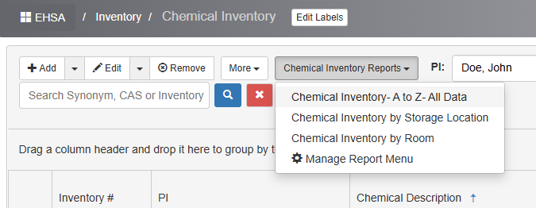
Login to EHS and go into Quick Chemical Entry. From the Chemical Inventory Reports menu, select “Chemical Inventory- A to Z- All Data.” The system will download an Excel file to your computer. If you have a pop-up blocker, you may need to give permission for the download.
Update the inventory as needed. Columns B through J must be filled out. Inventories will not be accepted for upload until the information is complete.
Questions?
John Silka, for FM inventories: john-silka@uiowa.edu, 319-335-8031
Elliot Kelley: elliot-kelley@uiowa.edu, 319-467-1305